> ## Documentation Index
> Fetch the complete documentation index at: https://docs.solanatracker.io/llms.txt
> Use this file to discover all available pages before exploring further.
# KOL Tracking
> Track Solana KOL wallet performance, rank influencers by PnL and win rate, and build copy-trading feeds with the Solana Tracker Data API.
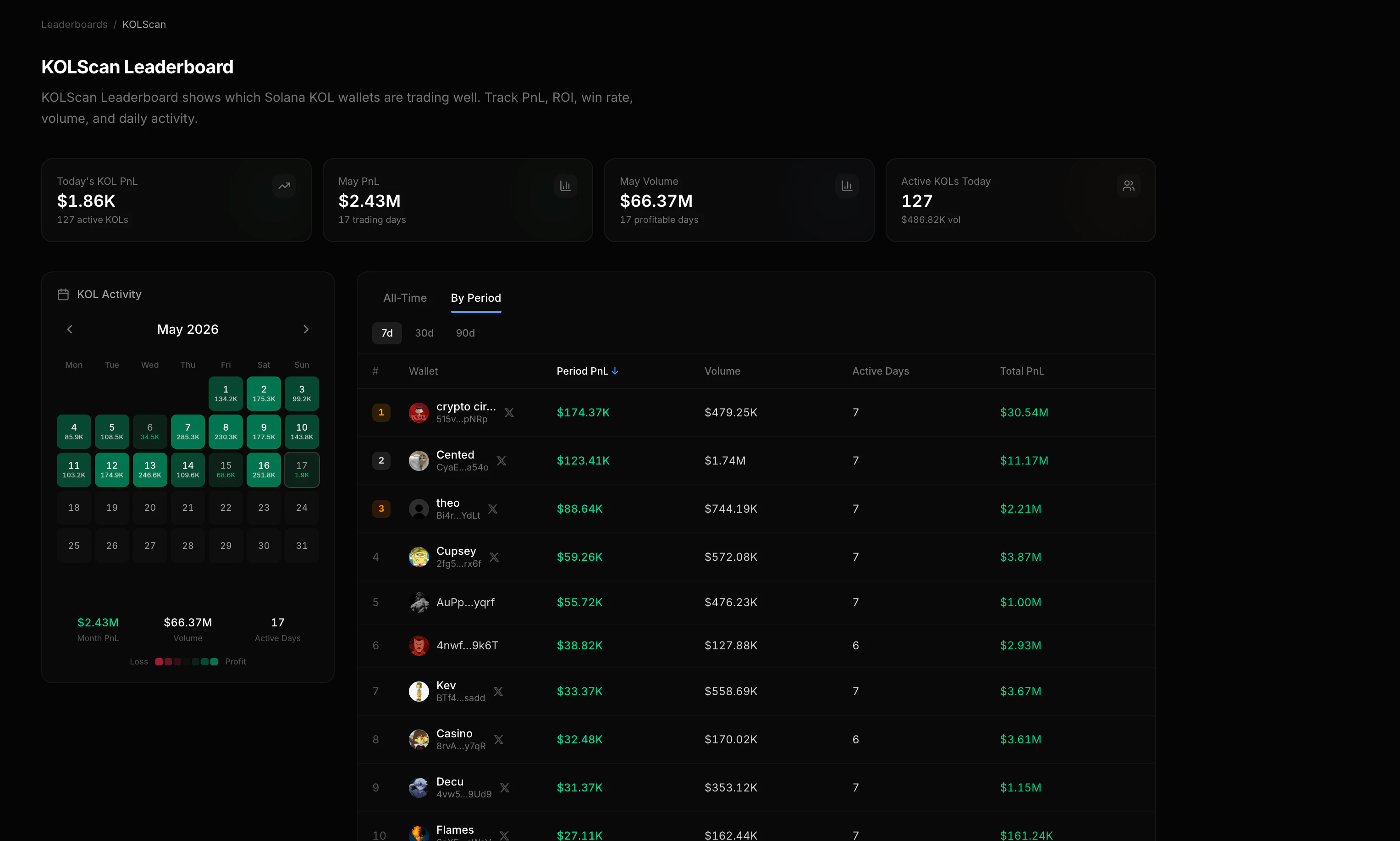
KOLs (Key Opinion Leaders) are tracked Solana wallets with a public identity, usually a Twitter handle, name, and avatar. When a KOL wallet also has a primary `.sol` domain, PnL V2 keeps the KOL as `identity.name` and adds `sns` alongside. See [SNS Primary Domain](/guides/pnl-v2/sns-identity). Use the KOL endpoints to rank them, compare performance over time, and feed their trades into alerts or dashboards.
 ## List All KOLs
The [KOL leaderboard](/data-api/pnl-v2/get-kol-leaderboard) returns all tracked KOL wallets ranked by performance.
```bash cURL theme={null}
curl "https://data.solanatracker.io/v2/pnl/leaderboard/kols?sort=realized&direction=desc&limit=25" \
-H "x-api-key: YOUR_API_KEY"
```
```javascript JavaScript theme={null}
const res = await fetch(
"https://data.solanatracker.io/v2/pnl/leaderboard/kols?sort=realized&direction=desc&limit=25",
{ headers: { "x-api-key": "YOUR_API_KEY" } }
);
const { traders } = await res.json();
traders.forEach((kol, i) => {
console.log(`#${i + 1} ${kol.identity.name} (@${kol.identity.twitter})`);
console.log(` PnL: $${kol.pnl.realized.toLocaleString()}, Win Rate: ${kol.winRate}%`);
});
```
```python Python theme={null}
import requests
res = requests.get(
"https://data.solanatracker.io/v2/pnl/leaderboard/kols",
params={"sort": "realized", "direction": "desc", "limit": 25},
headers={"x-api-key": "YOUR_API_KEY"}
)
for i, kol in enumerate(res.json()["traders"], 1):
print(f"#{i} {kol['identity']['name']}: ${kol['pnl']['realized']:,.2f}")
```
### Sort Options
| Field | Description |
| ---------------- | --------------------------------------------------------------------- |
| `total` | Total PnL (realized + unrealized) |
| `realized` | Locked-in profit |
| `unrealized` | Paper profit on open positions. Open positions are tokens still held. |
| `invested` | Total USD put in |
| `roi` | Return on investment |
| `win_percentage` | Win rate |
| `trades` | Number of trades |
| `tokens` | Number of tokens traded |
| `last_trade` | Most recent activity |
***
## Compare KOLs Over a Time Period
Use the [period leaderboard](/data-api/pnl-v2/get-kol-leaderboard-for-a-period) to rank KOLs within a specific window. This is useful for finding who's performing well *recently*, not just all-time.
```bash Last 7 days theme={null}
curl "https://data.solanatracker.io/v2/pnl/leaderboard/kols/period?period=7d&sort=realized&direction=desc" \
-H "x-api-key: YOUR_API_KEY"
```
```bash Custom range theme={null}
curl "https://data.solanatracker.io/v2/pnl/leaderboard/kols/period?start=2025-03-01&end=2025-03-31&sort=realized" \
-H "x-api-key: YOUR_API_KEY"
```
Supported `period` shortcuts: `1d`, `7d`, `14d`, `30d`, `90d`.
***
## KOL Calendar (Monthly Heatmap)
The [calendar endpoint](/data-api/pnl-v2/get-kol-calendar) returns aggregate KOL performance for each day in a month. Perfect for building heatmap UIs.
```bash theme={null}
curl "https://data.solanatracker.io/v2/pnl/leaderboard/kols/calendar?year=2025&month=3" \
-H "x-api-key: YOUR_API_KEY"
```
Each day includes total PnL, trade count, and active KOL count across the tracked set.
Color days by aggregate PnL to spot market-wide trends at a glance.
***
## Single-Day KOL Breakdown
The [daily breakdown](/data-api/pnl-v2/get-kol-daily-breakdown) shows every tracked KOL's activity for one specific day.
```bash theme={null}
curl "https://data.solanatracker.io/v2/pnl/leaderboard/kols/date?date=2025-03-15" \
-H "x-api-key: YOUR_API_KEY"
```
Use this to answer questions like "what did KOLs trade on launch day?" or "who had the best day during the pump?"
***
## Drill Into a KOL's Wallet
Once you find a KOL worth investigating, pass their wallet address to the wallet analysis endpoints:
```javascript theme={null}
// Get the KOL's full wallet summary
const wallet = "CyaE1VxvBrahnPWkqm5VsdCvyS2QmNht2UFrKJHga54o"; // from leaderboard
const summary = await fetch(
`https://data.solanatracker.io/v2/pnl/wallets/${wallet}`,
{ headers: { "x-api-key": "YOUR_API_KEY" } }
).then(r => r.json());
console.log(`Total PnL: $${summary.summary.pnl.total.toFixed(2)}`);
console.log(`Win Rate: ${summary.analysis.winRate}%`);
console.log(`Tokens Traded: ${summary.summary.counts.tokensTraded}`);
// Then get their current positions
const positions = await fetch(
`https://data.solanatracker.io/v2/pnl/wallets/${wallet}/positions?sort=value&direction=desc&limit=10`,
{ headers: { "x-api-key": "YOUR_API_KEY" } }
).then(r => r.json());
positions.data.forEach(p => {
console.log(`${p.meta.symbol}: $${p.pnl.total.toFixed(2)} PnL, holding $${p.position.valueUsd.toFixed(2)}`);
});
```
***
## Build a Copy-Trading Feed
Combine KOL tracking with token trades to build a real-time feed of what KOLs are buying:
1. **Pull the KOL list** from the leaderboard endpoint
2. **Check each wallet's positions** sorted by `last_trade` to see their latest moves
3. **Cross-reference tokens** using the [token info](/data-api/get-token-information) endpoint for metadata
4. **Set up alerts** by polling positions periodically and diffing against previous state
```javascript theme={null}
// Get top 10 KOLs
const { traders: kols } = await fetch(
"https://data.solanatracker.io/v2/pnl/leaderboard/kols?sort=realized&direction=desc&limit=10",
{ headers: { "x-api-key": "YOUR_API_KEY" } }
).then(r => r.json());
// Check each KOL's latest positions
for (const kol of kols) {
const { data: positions } = await fetch(
`https://data.solanatracker.io/v2/pnl/wallets/${kol.wallet}/positions?sort=last_trade&direction=desc&limit=5&filter=holding`,
{ headers: { "x-api-key": "YOUR_API_KEY" } }
).then(r => r.json());
console.log(`\n${kol.identity.name} (@${kol.identity.twitter}):`);
positions.forEach(p => {
console.log(` ${p.meta.symbol}: $${p.position.valueUsd.toFixed(2)} held`);
});
}
```
Full guide for inspecting any wallet's PnL, positions, and risk.
KOL and top trader rankings with all sort and filter options.
## List All KOLs
The [KOL leaderboard](/data-api/pnl-v2/get-kol-leaderboard) returns all tracked KOL wallets ranked by performance.
```bash cURL theme={null}
curl "https://data.solanatracker.io/v2/pnl/leaderboard/kols?sort=realized&direction=desc&limit=25" \
-H "x-api-key: YOUR_API_KEY"
```
```javascript JavaScript theme={null}
const res = await fetch(
"https://data.solanatracker.io/v2/pnl/leaderboard/kols?sort=realized&direction=desc&limit=25",
{ headers: { "x-api-key": "YOUR_API_KEY" } }
);
const { traders } = await res.json();
traders.forEach((kol, i) => {
console.log(`#${i + 1} ${kol.identity.name} (@${kol.identity.twitter})`);
console.log(` PnL: $${kol.pnl.realized.toLocaleString()}, Win Rate: ${kol.winRate}%`);
});
```
```python Python theme={null}
import requests
res = requests.get(
"https://data.solanatracker.io/v2/pnl/leaderboard/kols",
params={"sort": "realized", "direction": "desc", "limit": 25},
headers={"x-api-key": "YOUR_API_KEY"}
)
for i, kol in enumerate(res.json()["traders"], 1):
print(f"#{i} {kol['identity']['name']}: ${kol['pnl']['realized']:,.2f}")
```
### Sort Options
| Field | Description |
| ---------------- | --------------------------------------------------------------------- |
| `total` | Total PnL (realized + unrealized) |
| `realized` | Locked-in profit |
| `unrealized` | Paper profit on open positions. Open positions are tokens still held. |
| `invested` | Total USD put in |
| `roi` | Return on investment |
| `win_percentage` | Win rate |
| `trades` | Number of trades |
| `tokens` | Number of tokens traded |
| `last_trade` | Most recent activity |
***
## Compare KOLs Over a Time Period
Use the [period leaderboard](/data-api/pnl-v2/get-kol-leaderboard-for-a-period) to rank KOLs within a specific window. This is useful for finding who's performing well *recently*, not just all-time.
```bash Last 7 days theme={null}
curl "https://data.solanatracker.io/v2/pnl/leaderboard/kols/period?period=7d&sort=realized&direction=desc" \
-H "x-api-key: YOUR_API_KEY"
```
```bash Custom range theme={null}
curl "https://data.solanatracker.io/v2/pnl/leaderboard/kols/period?start=2025-03-01&end=2025-03-31&sort=realized" \
-H "x-api-key: YOUR_API_KEY"
```
Supported `period` shortcuts: `1d`, `7d`, `14d`, `30d`, `90d`.
***
## KOL Calendar (Monthly Heatmap)
The [calendar endpoint](/data-api/pnl-v2/get-kol-calendar) returns aggregate KOL performance for each day in a month. Perfect for building heatmap UIs.
```bash theme={null}
curl "https://data.solanatracker.io/v2/pnl/leaderboard/kols/calendar?year=2025&month=3" \
-H "x-api-key: YOUR_API_KEY"
```
Each day includes total PnL, trade count, and active KOL count across the tracked set.
Color days by aggregate PnL to spot market-wide trends at a glance.
***
## Single-Day KOL Breakdown
The [daily breakdown](/data-api/pnl-v2/get-kol-daily-breakdown) shows every tracked KOL's activity for one specific day.
```bash theme={null}
curl "https://data.solanatracker.io/v2/pnl/leaderboard/kols/date?date=2025-03-15" \
-H "x-api-key: YOUR_API_KEY"
```
Use this to answer questions like "what did KOLs trade on launch day?" or "who had the best day during the pump?"
***
## Drill Into a KOL's Wallet
Once you find a KOL worth investigating, pass their wallet address to the wallet analysis endpoints:
```javascript theme={null}
// Get the KOL's full wallet summary
const wallet = "CyaE1VxvBrahnPWkqm5VsdCvyS2QmNht2UFrKJHga54o"; // from leaderboard
const summary = await fetch(
`https://data.solanatracker.io/v2/pnl/wallets/${wallet}`,
{ headers: { "x-api-key": "YOUR_API_KEY" } }
).then(r => r.json());
console.log(`Total PnL: $${summary.summary.pnl.total.toFixed(2)}`);
console.log(`Win Rate: ${summary.analysis.winRate}%`);
console.log(`Tokens Traded: ${summary.summary.counts.tokensTraded}`);
// Then get their current positions
const positions = await fetch(
`https://data.solanatracker.io/v2/pnl/wallets/${wallet}/positions?sort=value&direction=desc&limit=10`,
{ headers: { "x-api-key": "YOUR_API_KEY" } }
).then(r => r.json());
positions.data.forEach(p => {
console.log(`${p.meta.symbol}: $${p.pnl.total.toFixed(2)} PnL, holding $${p.position.valueUsd.toFixed(2)}`);
});
```
***
## Build a Copy-Trading Feed
Combine KOL tracking with token trades to build a real-time feed of what KOLs are buying:
1. **Pull the KOL list** from the leaderboard endpoint
2. **Check each wallet's positions** sorted by `last_trade` to see their latest moves
3. **Cross-reference tokens** using the [token info](/data-api/get-token-information) endpoint for metadata
4. **Set up alerts** by polling positions periodically and diffing against previous state
```javascript theme={null}
// Get top 10 KOLs
const { traders: kols } = await fetch(
"https://data.solanatracker.io/v2/pnl/leaderboard/kols?sort=realized&direction=desc&limit=10",
{ headers: { "x-api-key": "YOUR_API_KEY" } }
).then(r => r.json());
// Check each KOL's latest positions
for (const kol of kols) {
const { data: positions } = await fetch(
`https://data.solanatracker.io/v2/pnl/wallets/${kol.wallet}/positions?sort=last_trade&direction=desc&limit=5&filter=holding`,
{ headers: { "x-api-key": "YOUR_API_KEY" } }
).then(r => r.json());
console.log(`\n${kol.identity.name} (@${kol.identity.twitter}):`);
positions.forEach(p => {
console.log(` ${p.meta.symbol}: $${p.position.valueUsd.toFixed(2)} held`);
});
}
```
Full guide for inspecting any wallet's PnL, positions, and risk.
KOL and top trader rankings with all sort and filter options.