> ## Documentation Index
> Fetch the complete documentation index at: https://docs.solanatracker.io/llms.txt
> Use this file to discover all available pages before exploring further.
# 钱包追踪
> 使用 Solana Tracker Data API 的钱包端点追踪任意 Solana 钱包的代币持仓、交易历史、投资组合图表与整体收益表现。
Data API 提供了用于追踪持仓、最近交易和投资组合价值的钱包端点。这些与 PnL V2 系统是独立的。当您需要快速的投资组合快照而无需完整的盈亏计算时,请使用它们。
PnL 表示盈亏。要获得带有成本基础、胜率和已实现利润的详细 PnL,请改用 [PnL V2 钱包端点](/cn/guides/pnl-v2/wallet-analysis)。
## 钱包代币
[wallet tokens 端点](/cn/data-api/get-wallet-tokens)返回钱包持有的所有代币及当前价值。
```bash cURL theme={null}
curl "https://data.solanatracker.io/wallet/{walletAddress}" \
-H "x-api-key: YOUR_API_KEY"
```
```javascript JavaScript theme={null}
const wallet = "YOUR_WALLET_ADDRESS";
const res = await fetch(`https://data.solanatracker.io/wallet/${wallet}`, {
headers: { "x-api-key": "YOUR_API_KEY" }
});
const tokens = await res.json();
tokens.forEach(t => {
console.log(`${t.token.name}: ${t.balance} ($${t.valueUsd?.toFixed(2)})`);
});
```
```python Python theme={null}
import requests
wallet = "YOUR_WALLET_ADDRESS"
res = requests.get(f"https://data.solanatracker.io/wallet/{wallet}",
headers={"x-api-key": "YOUR_API_KEY"})
for t in res.json():
print(f"{t['token']['name']}: {t['balance']} (${t.get('valueUsd', 0):.2f})")
```
### 分页持仓
对于持有许多代币的钱包,请使用[分页端点](/cn/data-api/get-wallet-tokens-with-pagination):
```bash theme={null}
# Page 1 (first page)
curl "https://data.solanatracker.io/wallet/{wallet}/page/1" \
-H "x-api-key: YOUR_API_KEY"
```
***
## 钱包基本信息
[basic wallet 端点](/cn/data-api/get-basic-wallet-information)返回轻量级摘要——总价值和代币数量,不包含完整代币列表。
```bash theme={null}
curl "https://data.solanatracker.io/wallet/{wallet}/basic" \
-H "x-api-key: YOUR_API_KEY"
```
***
## 钱包交易
[wallet trades 端点](/cn/data-api/get-wallet-trades)返回钱包在所有代币上的最近交易。
```bash cURL theme={null}
curl "https://data.solanatracker.io/wallet/{wallet}/trades" \
-H "x-api-key: YOUR_API_KEY"
```
```javascript JavaScript theme={null}
const wallet = "YOUR_WALLET_ADDRESS";
const res = await fetch(`https://data.solanatracker.io/wallet/${wallet}/trades`, {
headers: { "x-api-key": "YOUR_API_KEY" }
});
const trades = await res.json();
trades.forEach(t => {
const side = t.side === "buy" ? "BUY" : "SELL";
console.log(`${side} ${t.token.symbol}: $${t.volumeUsd?.toFixed(2)} at ${new Date(t.time).toISOString()}`);
});
```
***
## 投资组合图表
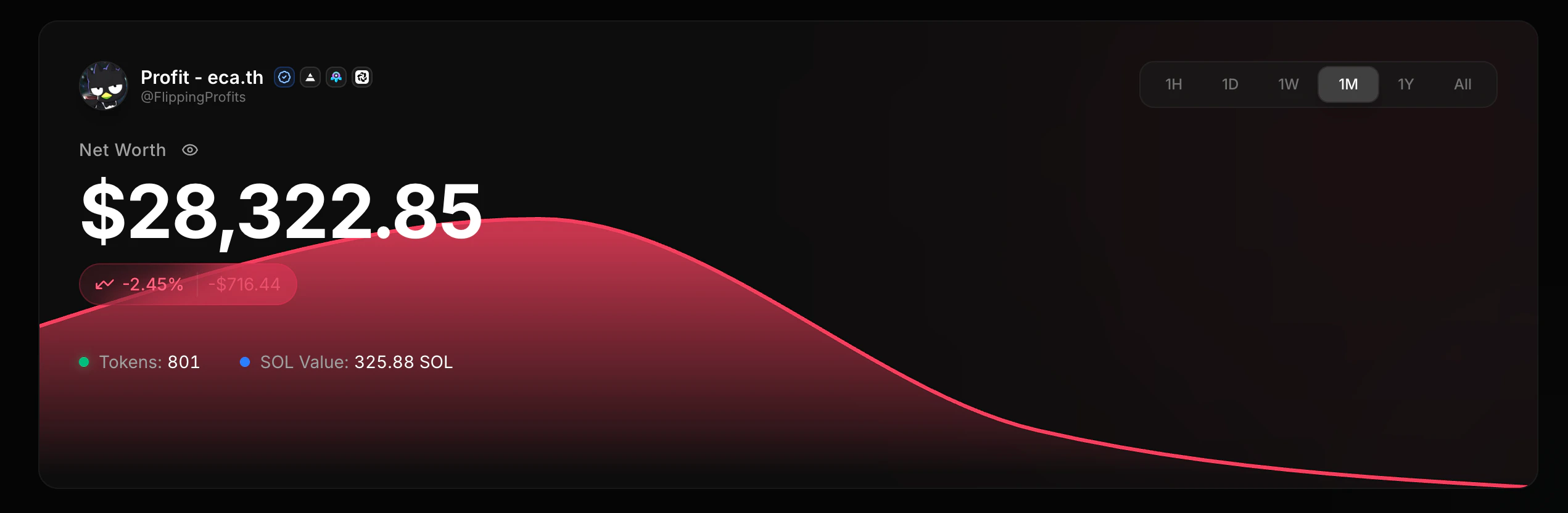
[wallet chart 端点](/cn/data-api/get-wallet-portfolio-chart)返回历史投资组合价值随时间的变化,用于构建权益曲线。权益曲线是投资组合价值随时间变化的折线图。
 ```bash theme={null}
curl "https://data.solanatracker.io/wallet/{wallet}/chart" \
-H "x-api-key: YOUR_API_KEY"
```
***
## 钱包 PnL
使用 [PnL V2](/cn/guides/pnl-v2/overview) 获取钱包摘要、代币持仓、身份标签、PnL 模式和批量查询。
```bash theme={null}
# Wallet-level PnL summary
curl "https://data.solanatracker.io/v2/pnl/wallets/{wallet}" \
-H "x-api-key: YOUR_API_KEY"
# All token positions for a wallet
curl "https://data.solanatracker.io/v2/pnl/wallets/{wallet}/positions?sort=total&direction=desc" \
-H "x-api-key: YOUR_API_KEY"
# Token-specific PnL
curl "https://data.solanatracker.io/v2/pnl/wallets/{wallet}/tokens/{token}" \
-H "x-api-key: YOUR_API_KEY"
```
***
## 顶级交易者
使用 [Solana 交易者排行榜](/cn/guides/pnl-v2/leaderboards#solana-traders-leaderboard)获取 Solana 全网的交易者排名,使用[代币情报](/cn/guides/pnl-v2/token-intelligence)获取特定代币的交易者排名。
### Solana 交易者排行榜
```bash theme={null}
curl "https://data.solanatracker.io/v2/pnl/leaderboard/top?days=30&sort=realized&direction=desc&limit=50" \
-H "x-api-key: YOUR_API_KEY"
```
### 特定代币顶级交易者
```bash theme={null}
curl "https://data.solanatracker.io/v2/pnl/tokens/{token}/traders?sort=pnl&direction=desc&limit=50" \
-H "x-api-key: YOUR_API_KEY"
```
***
## 示例:钱包面板
```javascript theme={null}
const wallet = "YOUR_WALLET_ADDRESS";
const headers = { "x-api-key": "YOUR_API_KEY" };
// 1. Basic info
const basic = await fetch(
`https://data.solanatracker.io/wallet/${wallet}/basic`, { headers }
).then(r => r.json());
// 2. All holdings
const holdings = await fetch(
`https://data.solanatracker.io/wallet/${wallet}`, { headers }
).then(r => r.json());
// 3. Recent trades
const trades = await fetch(
`https://data.solanatracker.io/wallet/${wallet}/trades`, { headers }
).then(r => r.json());
// 4. Portfolio chart
const chart = await fetch(
`https://data.solanatracker.io/wallet/${wallet}/chart`, { headers }
).then(r => r.json());
console.log(`Tokens held: ${holdings.length}`);
console.log(`Recent trades: ${trades.length}`);
console.log(`Chart data points: ${chart.length}`);
```
带有成本基础、胜率和持仓追踪的完整 PnL 计算。
随时间追踪和比较 KOL 钱包表现。
实时监控钱包交易和余额变化。
流式传输钱包投资组合中代币的实时价格。
```bash theme={null}
curl "https://data.solanatracker.io/wallet/{wallet}/chart" \
-H "x-api-key: YOUR_API_KEY"
```
***
## 钱包 PnL
使用 [PnL V2](/cn/guides/pnl-v2/overview) 获取钱包摘要、代币持仓、身份标签、PnL 模式和批量查询。
```bash theme={null}
# Wallet-level PnL summary
curl "https://data.solanatracker.io/v2/pnl/wallets/{wallet}" \
-H "x-api-key: YOUR_API_KEY"
# All token positions for a wallet
curl "https://data.solanatracker.io/v2/pnl/wallets/{wallet}/positions?sort=total&direction=desc" \
-H "x-api-key: YOUR_API_KEY"
# Token-specific PnL
curl "https://data.solanatracker.io/v2/pnl/wallets/{wallet}/tokens/{token}" \
-H "x-api-key: YOUR_API_KEY"
```
***
## 顶级交易者
使用 [Solana 交易者排行榜](/cn/guides/pnl-v2/leaderboards#solana-traders-leaderboard)获取 Solana 全网的交易者排名,使用[代币情报](/cn/guides/pnl-v2/token-intelligence)获取特定代币的交易者排名。
### Solana 交易者排行榜
```bash theme={null}
curl "https://data.solanatracker.io/v2/pnl/leaderboard/top?days=30&sort=realized&direction=desc&limit=50" \
-H "x-api-key: YOUR_API_KEY"
```
### 特定代币顶级交易者
```bash theme={null}
curl "https://data.solanatracker.io/v2/pnl/tokens/{token}/traders?sort=pnl&direction=desc&limit=50" \
-H "x-api-key: YOUR_API_KEY"
```
***
## 示例:钱包面板
```javascript theme={null}
const wallet = "YOUR_WALLET_ADDRESS";
const headers = { "x-api-key": "YOUR_API_KEY" };
// 1. Basic info
const basic = await fetch(
`https://data.solanatracker.io/wallet/${wallet}/basic`, { headers }
).then(r => r.json());
// 2. All holdings
const holdings = await fetch(
`https://data.solanatracker.io/wallet/${wallet}`, { headers }
).then(r => r.json());
// 3. Recent trades
const trades = await fetch(
`https://data.solanatracker.io/wallet/${wallet}/trades`, { headers }
).then(r => r.json());
// 4. Portfolio chart
const chart = await fetch(
`https://data.solanatracker.io/wallet/${wallet}/chart`, { headers }
).then(r => r.json());
console.log(`Tokens held: ${holdings.length}`);
console.log(`Recent trades: ${trades.length}`);
console.log(`Chart data points: ${chart.length}`);
```
带有成本基础、胜率和持仓追踪的完整 PnL 计算。
随时间追踪和比较 KOL 钱包表现。
实时监控钱包交易和余额变化。
流式传输钱包投资组合中代币的实时价格。